Skip to content
LernplanerOpen the app

Know what to study today – and whether you're on track.

Lernplaner is your coach until exam day: it remembers what you've mastered, plans every day for you, catches up on what you missed and warns you before time runs short.

Start for free See the demo

No credit card. From age 16.

Try it: your plan in one minute

Example – this is how it looks in the app. No real data, no AI call.

    How it works

    1. Add your exam

      Pick a template for your Abitur or Bac, or upload your course syllabus. Add the date – done.

    2. Set your study time

      How many minutes a day, on which days? Lernplaner spreads the material across them.

    3. Know what's on every day

      Your plan is ready in the morning. Miss a day and Lernplaner replans and tells you honestly what it costs.

    What Lernplaner does differently

    A plan that adapts

    Every study day gets its share – from your time, your exams and what's still open. Missed work is spread out, not forgotten.
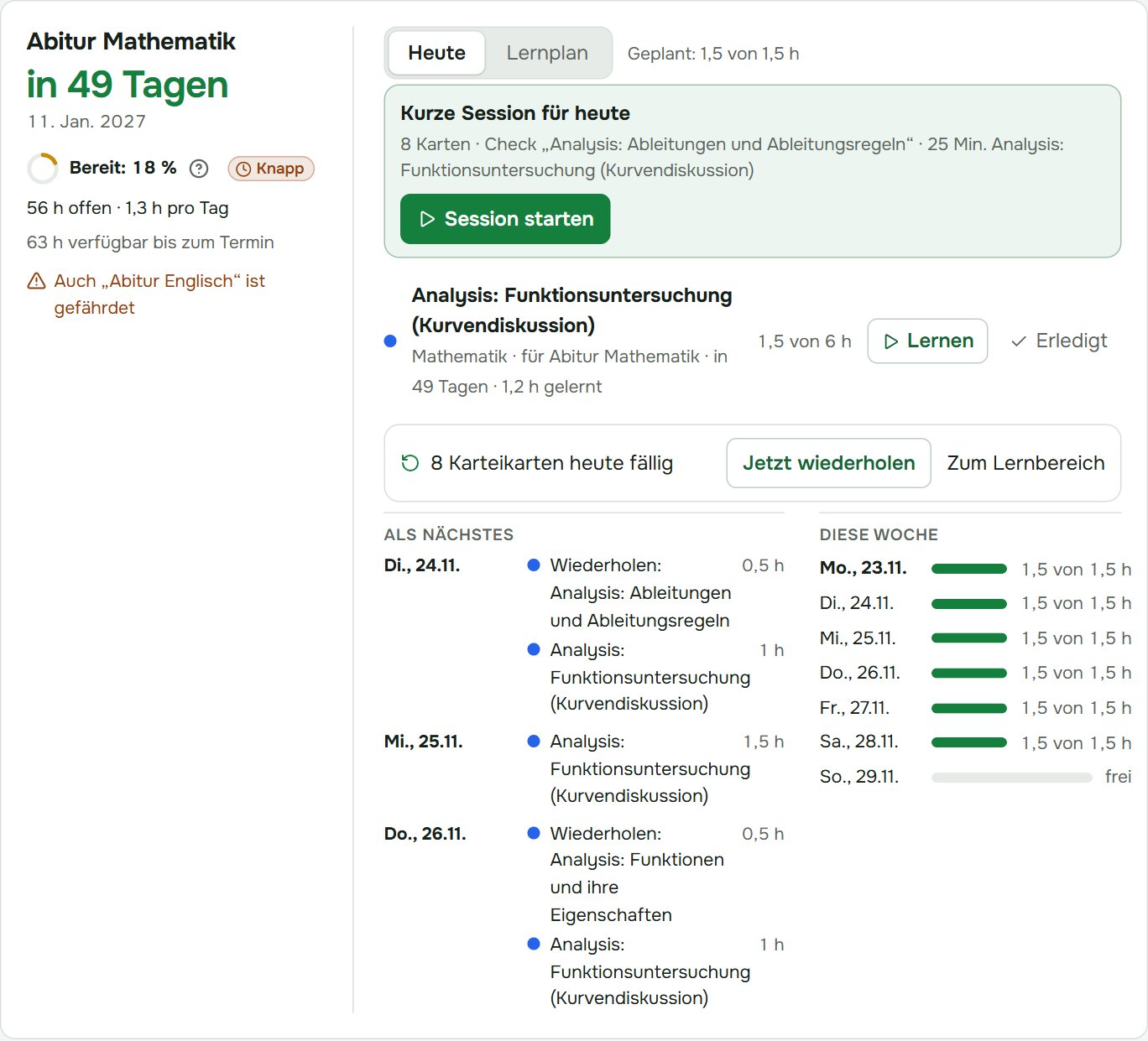
    The Today view in the app: countdown, readiness and today's topics

    Readiness measured, not guessed

    Quiz results, reviews and hours studied show how ready you are – with an honest forecast up to the date.
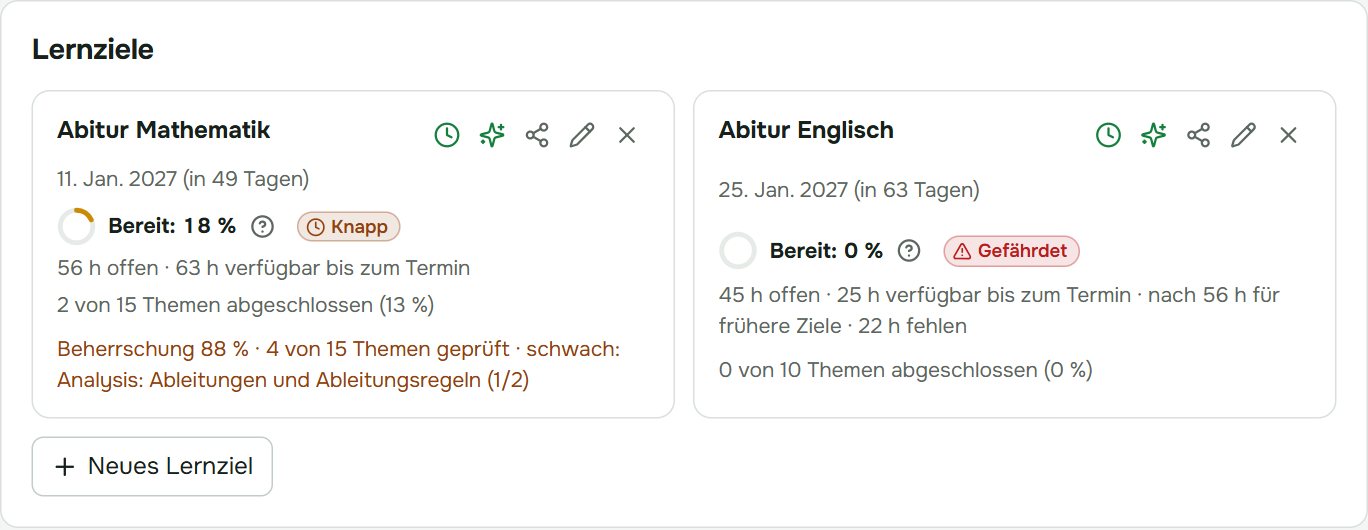
    Goals with readiness and forecast

    Review at the right time

    Topics and flashcards come back just before you'd forget them. On Sundays a weekly report shows what changed.
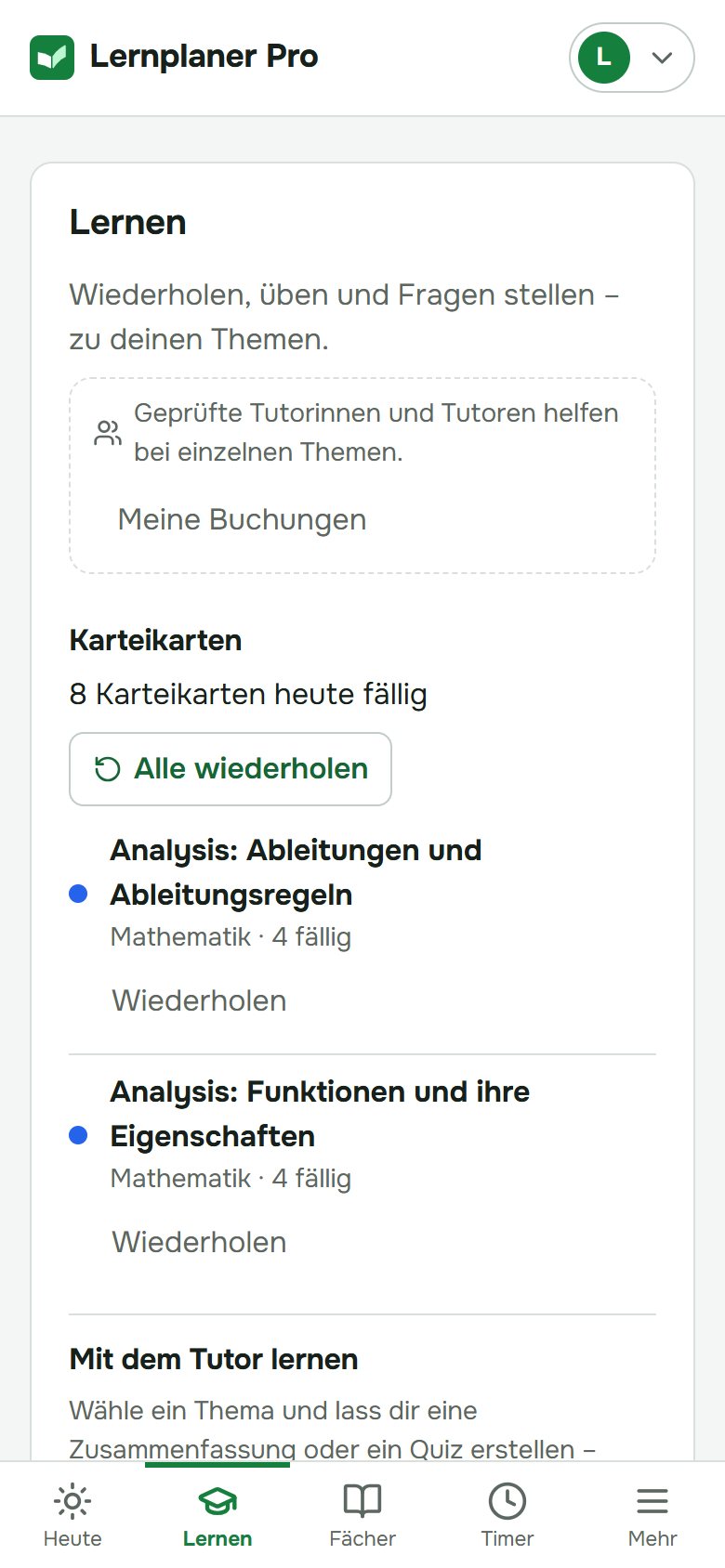
    The Study area on a phone: due flashcards and the tutor

    Your own course files

    Upload your lecture notes: the AI tutor's summaries, quizzes and answers draw on them and cite the pages.

    Several exams at once

    Lernplaner shares your time across all exams and warns you if one falls behind.

    Why not just ChatGPT? AI assistants explain brilliantly – Lernplaner itself uses Claude. What a plan across weeks adds on top: an honest comparison.

    Templates for your exam

    Topic lists with estimated study hours for the Abitur in all 16 German states and the Bac – as a starting point for your plan.

    All exam templates

    Safe and fair

    • Servers in Frankfurt am Main (EU). AI features use Claude by Anthropic, only with your consent.
    • No ads, no selling of data, no trackers on this website.
    • From age 16. Study groups are moderated, reports are reviewed.
    • Export your data any time, or delete it together with your account.

    Privacy policy

    Free – and what AI calls are

    Planning, Today, goals, reviews, flashcards, study groups and the timer are free. AI features have a quota:

    • 30 AI calls per month, at most 15 per day
    • 1 call = 1 summary, 1 quiz, 1 exercise or 1 set of flashcards
    • In the conversation with the tutor, every 3 questions count as 1 call
    • Flashcards you write yourself and reviews cost nothing

    Learn more

    Frequently asked questions

    How is my study plan made?

    You create goals with a date, for example an exam, and add topics with estimated hours to them. In the “Study plan” view you set your study time per day and your study days (default: 2 hours, Monday to Saturday). From that, the plan spreads your open topics over the coming study days automatically:

    • The exam day itself is not a study day: everything should be done the day before.
    • Every goal gets its share on every study day. If there is not enough time, the goal with the earliest date comes first.
    • Within a goal, topics in progress come before new ones, then by priority. Large topics are split over several days.
    • If something no longer fits before the date, the plan shows how many hours are missing and how much study time per day would be needed.
    • Topics with a quiz or flashcard result get short reviews before the exam, weakest first.
    • The plan looks up to 120 days ahead and is recalculated whenever you change something.
    What does “Today” show?

    “Today” is the first day of your study plan: what is due today, within your study time. It also shows the countdown to your next goal and, for each goal, how ready you are – based on the hours done and, if you have them, your quiz results – and whether the time until the date is enough. Without a goal with a date you see your most important open topics.

    What are AI calls and how are they counted?

    All AI features share one quota: importing a syllabus, summaries, quizzes, exercises and feedback on your answer, study sheets and mixed quizzes per goal, generating flashcards and the conversation with the tutor.

    Each account has 30 AI calls per calendar month. The quota starts again on the 1st of each month (UTC). The app shows how many calls you have left next to the AI features.

    How calls are counted

    • One call is one successful generation, for example a summary or a quiz.
    • An imported PDF counts as one call per started 100 pages, a scanned PDF (without a text layer) per started 25 pages, because every page is processed as an image.
    • In the conversation with the tutor, every 3 questions count as one call.
    • Generating flashcards is one call for up to 15 cards. Writing your own cards and reviewing them costs nothing.
    • Looking at a saved result again costs nothing; generating it again counts again.
    • If a request fails before anything was charged (for example without a connection), it does not count.

    Other limits

    • At most 15 calls per account per day (the day changes at midnight UTC). Calls that failed after the AI provider had already charged for them count here too – at most 10 of those per month.
    • There is a shared monthly limit for the whole service so that costs stay manageable. When it is reached, AI features pause for everyone until the next month.

    For the AI features, the necessary content is sent to Anthropic (Claude). What is sent and what is stored is described in the privacy policy (in German). AI can be wrong: check the results against your course material.

    What is free is summarised on Free & AI.

    What happens to my data?
    • No ads and no selling of data.
    • Usage statistics are anonymous counters with no link to individual people – no cookies and no external service.
    • Nothing is sent to Anthropic unless you use an AI feature.
    • Your data stays stored until you delete your account.

    All details are in the privacy policy (in German).

    How do I back up my data?

    Open the menu with your name at the top right and choose “Back up and import …”. There you can download a complete export as JSON (to import it again later) or as CSV.

    All questions in Help

    Your next exam is coming.

    Get started in a minute – free and without ads.

    Start for free